Food production leaves little room for guesswork. Many raw materials have limited shelf lives, finished goods may expire quickly, and demand can change due to weather, holidays, promotions, or retail customer orders. Producing too little can mean empty shelves. Producing too much can mean waste, discounting, or products being thrown away.
A good sales forecast helps small food manufacturers plan earlier. If last year’s summer sales show a clear increase in bottled drinks, sauces, or ice cream, the business can prepare ingredients, packaging, and production time before the busy period begins. If demand is slowing, production can be reduced before excess stock builds up.
Forecasting also improves purchasing. Food manufacturers depend on suppliers for fresh produce, dairy, meat, spices, packaging, labels, and specialist ingredients. Some items can be bought quickly, while others have longer lead times or minimum order quantities. A forecast gives purchasing time to order the right materials.
Common forecasting methods
Historical sales forecasting uses past order data to estimate future demand. This works well for standard products with repeat customers, such as regular wholesale orders, retail lines, or popular SKUs sold through e-commerce.
Seasonal forecasting is especially important in food manufacturing. Many products sell differently by season: barbecue sauces may peak in summer, baked goods may rise around holidays, and health-focused snacks may perform better in January. Comparing forecasted demand with the same period last year helps spot patterns.
Trend-based forecasting looks at whether demand is rising, falling, or staying stable. If sales of a vegan product range have grown steadily, the forecast may show that production, ingredients, and packaging need to be scaled up.
Manual forecasting adds business knowledge that data alone cannot see, such as an upcoming retail promotion, a new distributor, a large catering order, or a customer likely to reduce purchases. These insights should adjust the forecast before planning.
Connecting forecasts to production
A forecast only becomes useful when it affects production and purchasing decisions. For a make-to-stock food manufacturer, the forecast can help decide how many finished products to make in each period. For a make-to-order producer, it may still help plan shared ingredients, semi-finished goods, packaging, and labor.
The next step is connecting forecasted quantities to recipes and bills of materials. If the forecast shows demand for 2,000 jars of sauce, the business needs to know how much tomato, oil, spice mix, glass jars, lids, and labels are required. This is where forecasting becomes material planning.
Capacity must also be checked. A forecast may look achievable on paper, but production may be limited by mixing tanks, ovens, chilling time, filling lines, labor availability, cleaning cycles, or allergen changeovers. Reviewing demand against capacity helps avoid unrealistic delivery promises.
Using ERP for food manufacturing forecasts
Manufacturing ERP systems make sales forecasting more practical by connecting expected demand with real production, inventory, purchasing, and scheduling data. Instead of maintaining forecasts in separate spreadsheets, manufacturers can use ERP-based forecasting to keep demand planning closer to customer order history, item data, stock levels, and production workflows.
In MRPeasy, sales forecasting allows users to quickly create accurate forecasts. Forecast horizons can be set to 3, 6, 12, or 18 months, and the starting month can be up to two years in the future. Each forecast can include up to 100 products.
MRPeasy generates forecast values automatically using historical customer order data. The calculation is based on ordered quantities and delivery dates, while quotations and canceled orders are excluded. If a product does not have at least three months of non-empty historical sales data, the system flags it as lacking historical data, but forecast values can still be entered manually.
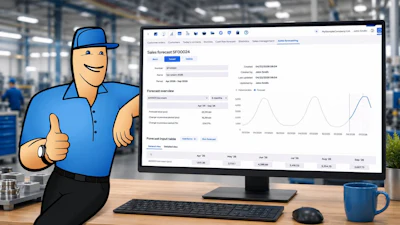
Forecasts are displayed in a product-by-month table where users can review, enter, or adjust expected quantities. The General view shows forecast values, while the Detailed view adds context such as actual sales, previous-year values, and year-on-year changes. This makes it easy to refine the forecast using market knowledge or customer insight.
Forecasts can also be reviewed in an overview section that shows totals, trends, and comparisons with previous periods or previous-year values.
The greatest planning value comes from connecting forecasts with the Master Production Schedule. Once linked, forecasted quantities populate the sales forecast row in the MPS, helping align production and purchasing with expected demand.
For more information, visit www.MRPeasy.com.